
Your AI, at the cursor.
Goodman OS opens inside your document. Lawyers draft, mark up redlines, and clear routine tasks without leaving Microsoft Word.
Where the work lives.
Legal work happens in the document. So the AI belongs there too - beside your cursor, ready when you need a clause, a redline check, or a full rewrite.
Your lawyers stay in charge. They ask, adjust, and decide. Goodman OS does the grind and shows the source behind every suggestion.
Write and mark up in place.
Draft for the matter
Select a gap, ask for the clause. Goodman OS writes it in your firm's voice, using the surrounding document and your standards.
Check the markup
Paste the other side's redline. The add-in flags what strays from your language, names the risk, and offers edits to take or drop.
Refine as you go
Chat beside the text to tighten wording or test a definition. Each reply links back to its source.
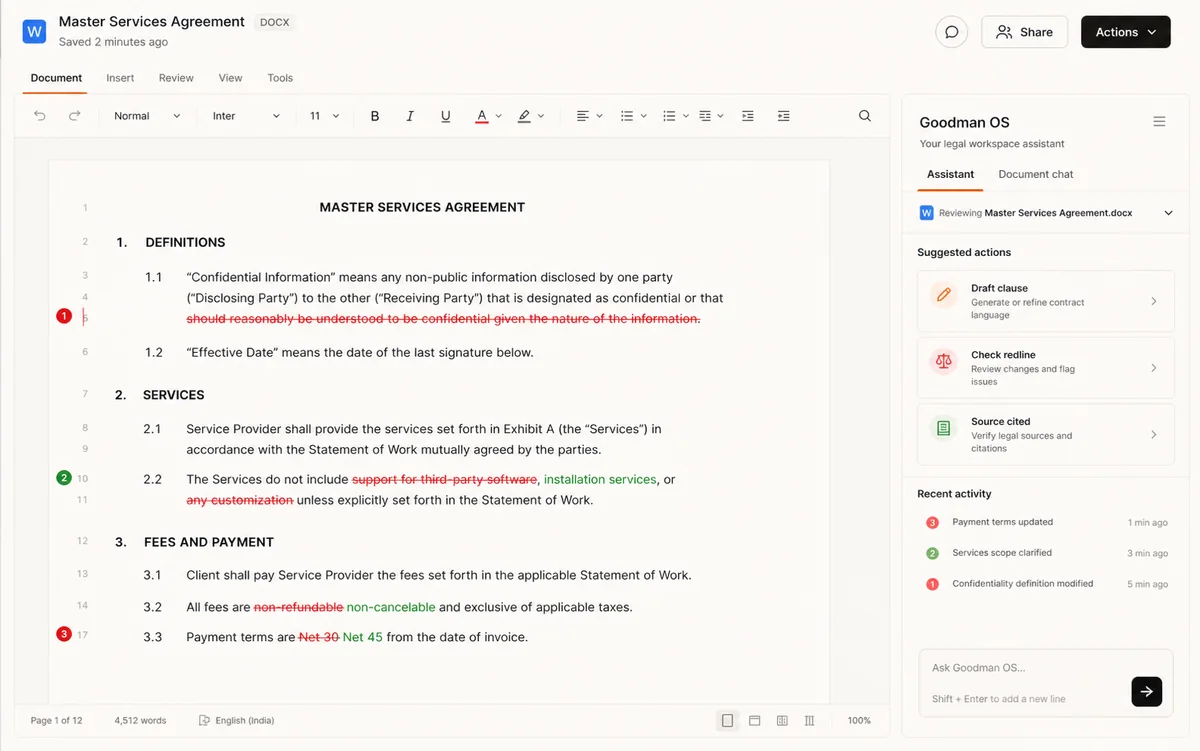
- In-document - the panel runs in Word; formatting, tracked changes, and comments stay put.
- Context-aware - it reads the whole agreement, not one sentence.
- Cited - hover any output for the clause or standard behind it.
- Reversible - every change arrives as a tracked edit you approve.
Your standards, applied.
Bring your positions, fallbacks, and red lines into Word. Goodman OS checks each clause against them and flags where a document falls short.
Set it up once
Save your preferred terms and fallbacks as a playbook. No code, no tech team.
Reuse it anywhere
Aim it at any agreement. The add-in marks what fits, what drifts, and where to push back.
Need richer review flows? Build them with Owlious - custom apps and workflows, no code.
One click, tedious task gone.
Small chores pile up. Actions clear them in a click, inside the document.
Add your intake details and the template populates - parties, dates, defined terms, and cross-references, all consistent.
See it in a walkthrough ->Remove names and identifying details in one pass for a version you can safely share or reuse.
See it in a walkthrough ->Sharpen a clause or section for clarity while keeping your meaning and tracked changes.
See it in a walkthrough ->Convert a passage into another language in Word, with legal terms and formatting intact.
See it in a walkthrough ->Part of a bigger system.
Word is one surface. The same workspace handles review, research, and custom builds - all linked.
The AI workspace your lawyers drive - drafting, review, and research together, every answer cited.
Explore Goodman OS ->Ask a question, get answers grounded in authority, with citations you can open.
See Legal Research in Goodman OS ->Bring Goodman OS into Word.
Watch drafting, redlining, playbooks, and Actions in a live document.
Built for lawyers / Private by default / Cited to source