
Where drafts get written.
Move findings from Tabular Review and the assistant onto the page. Write, sharpen, and export in one place.
Answers become documents.
Other tools stop at the result. Editor lets you build it into the memo, clause, or letter you send. You write; the platform does the grunt work.
No blank page.
It knows your matter
Point Editor at your files, review grid, or research thread. First drafts come back grounded in those documents.
You keep control
Ask for a tighter clause or a plain-English rewrite. Every suggestion links to its source, so you check before you accept.
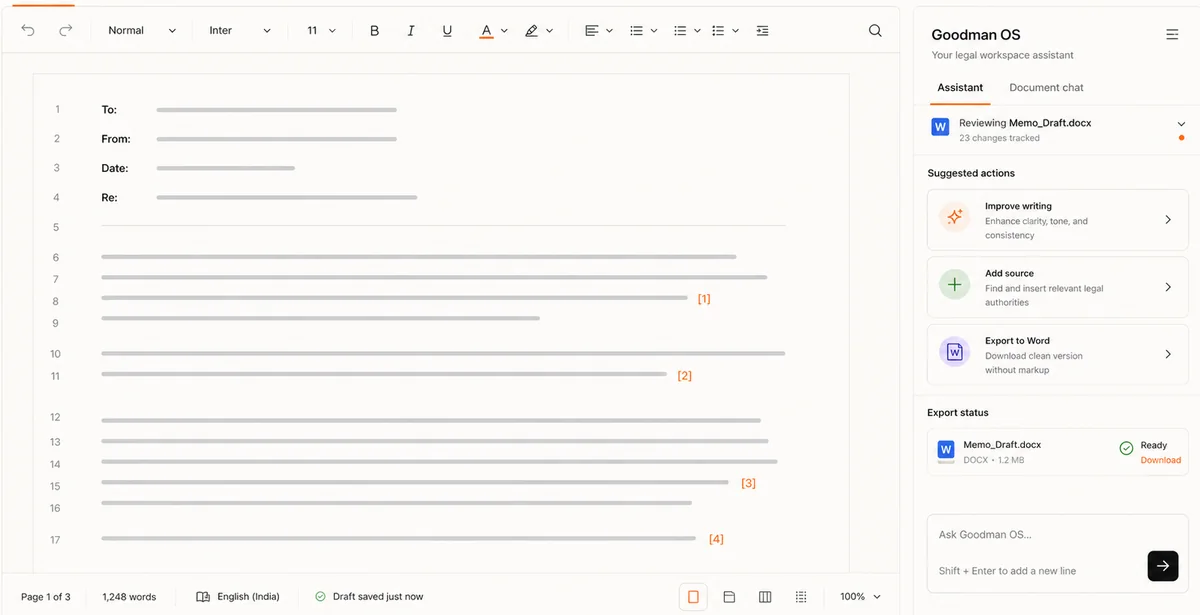
- Pull, don't retype. Send Tabular Review answers and assistant output straight into the draft.
- Prompt in place. Fix wording inline, without switching tools.
- Stay grounded. Citations travel with the text.
Edit as a team.
Associate and partner work the same document toward a version everyone can sign off on.
Everyone edits one draft. No chain of attachments.
What changed, and why. Revisions stay readable.
Call the assistant into any passage to cut, expand, or restructure. Keep what works.
Send it out clean.
House style intact
Export to Word with your structure, numbering, and formatting kept. It reads like your firm made it.
Finish in Word
Carry on in the Word add-in. Nothing gets rebuilt.
Part of the workspace.
Editor sits next to review, research, and the apps your team builds. A draft is always a step from the work behind it.
The AI workspace your lawyers run, from first question to final document.
Explore Goodman OS ->Ask the law hard questions. Get answers cited to source, ready to draft from.
See Legal Research in Goodman OS ->- Tabular Review. Turn document sets into a grid of answers, then draft from them. Tabular Review ->
- Word Add-In. Finish and format in the environment lawyers know. Word Add-In ->
Watch a draft take shape.
See research become a finished, cited document in minutes.
Built for lawyers / Private by default / Cited to source